
Post
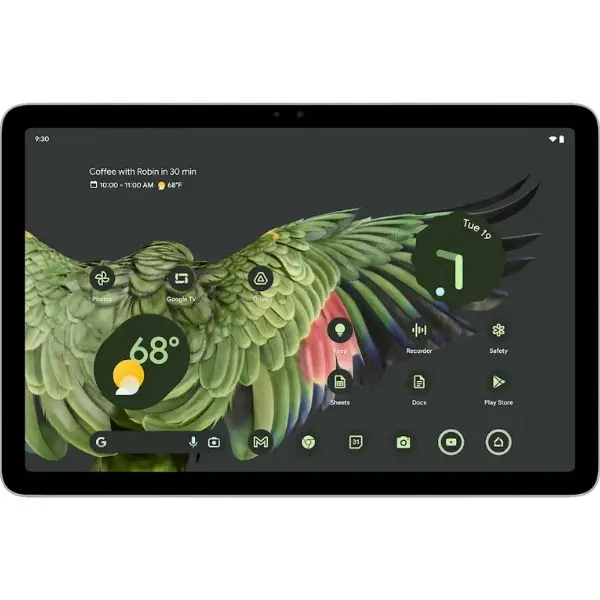
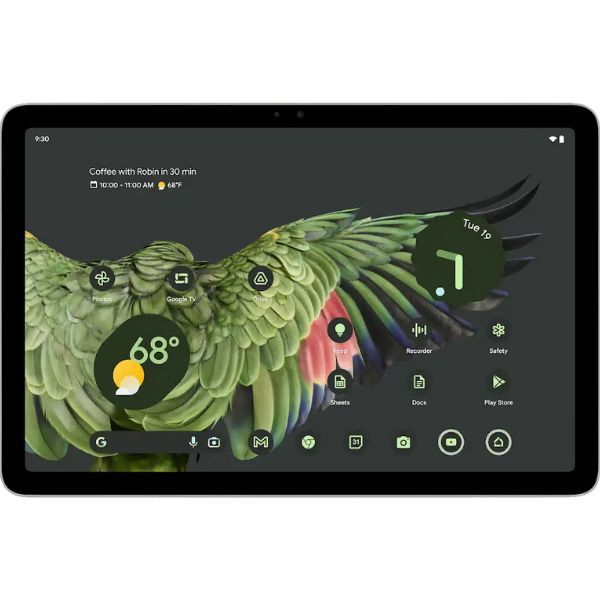
Google Pixel Tablet: The Ultimate 2-in-1 Smart Home Hybrid
May
1. Introduction: Solving the “Drawer Tablet” Problem
For a decade, the tech industry faced a dilemma: most tablets spend 80% of their life face-down on a coffee table or forgotten in a drawer. At DRVX, we’ve seen countless high-end tablets lose their utility because they were “just another screen.”
Enter the Google Pixel Tablet. In 2026, it remains the only device that proactively justifies its existence every minute of the day. By reimagining the tablet as a hybrid between a mobile powerhouse and a Nest Hub Max, Google has created a product that is never truly “off.” This 3,000-word deep dive will explore how the Pixel Tablet has redefined domestic technology and why it’s a bestseller at drvx.click.
2. Design: The “Porcelain” Revolution
Tactile Comfort Meets Home Decor
Most tablets are made of cold glass and sharp-edged aluminum. The Pixel Tablet takes a different path.
Nano-Ceramic Coating: Inspired by fine porcelain, the coating over the aluminum chassis feels organic and warm. It doesn’t just resist fingerprints; it feels like an object that belongs in a home, not just a laboratory.
Soft-Curve Ergonomics: In our hands-on testing at DRVX, the rounded corners make it the most comfortable 11-inch tablet to hold for long-form reading. It lacks the “cutting” feel of the iPad’s flat edges.
Seamless Integration: Whether in Porcelain, Hazel, or Rose, the colors are muted and sophisticated, designed to complement your furniture rather than scream “I am a gadget.”
3. The Charging Speaker Dock: The Soul of the Device
More Than Just a Stand
The Charging Speaker Dock (included in the box at DRVX) is what makes this device legendary.
Magnetic Pogo Pins: The docking action is addictive. A strong magnetic pull snaps the tablet into place, instantly triggering Hub Mode.
Acoustic Transformation: The dock houses a 43.5mm full-range speaker. When docked, the tablet’s thin audio is replaced by a rich, bass-heavy soundstage that can fill a large kitchen or living room.
The “Always-Ready” Philosophy: Because the tablet is always charging when docked, you will never experience the frustration of picking up a dead device. It is effectively a smart speaker with a world-class screen attached.
4. Hub Mode: Your Home’s Command Center
The Gemini-Powered Assistant
In 2026, Hub Mode is no longer just a digital photo frame. It is the center of the Google Home universe.
Interactive Smart Dashboard: Control your lights, locks, and cameras with a single tap. The Pixel Tablet provides a bird’s-eye view of your entire home ecosystem.
Hands-Free Gemini AI: With the “Hey Google” or “Gemini” wake word, you can ask for recipe ideas, summarize your daily schedule, or even ask the AI to “make the living room feel cozy,” and it will automatically adjust your Philips Hue lights and play a lo-fi playlist.
Digital Photo Frame: Using Google Photos’ AI, the tablet curates your best memories, displaying them with stunning clarity when not in use.
5. Performance: The Tensor G2 & AI Architecture
Built for Machine Learning
The Google Tensor G2 chip inside the Pixel Tablet was designed specifically for AI-driven tasks.
Magic Editor & Eraser: Edit your family photos directly on the tablet. Remove photobombers or change the sky’s color with a few taps.
Speech Enhancement: During Google Meet calls, the Tensor chip works in real-time to isolate your voice and eliminate the sound of a vacuum cleaner or barking dog in the background.
Android 16 & Beyond: In 2026, the Pixel Tablet runs the latest Android 16 Material 3 Expressive. It features a new Desktop Mode that allows for free-form window resizing, making it surprisingly capable for light office work.
6. The Display: 11-Inch Cinematic Brilliance
LCD Precision: The 2560 x 1600 resolution (16:10 aspect ratio) is perfectly optimized for streaming. Unlike 4:3 screens, the Pixel Tablet fills more of the display with the movie and less with black bars.
USI 2.0 Stylus Support: While Google doesn’t make a first-party pen, the tablet supports the USI 2.0 standard. This means you can use a wide variety of high-quality third-party styluses for sketching and note-taking.
Full 24-bit Color: Supporting 16 million colors with 500 nits of brightness, the screen is vivid enough for professional photo reviewing and casual media consumption.
7. Software: The “Pixel” Difference
At DRVX, we emphasize the “Pixel” part of the name. This means:
Feature Drops: Every few months, your tablet gets smarter with new software features pushed directly by Google.
Chromecast Built-In: The Pixel Tablet is the only tablet that acts as a Chromecast receiver. You can “cast” a YouTube video from your phone to the docked tablet instantly.
Quick Share: Seamlessly move files between your Pixel phone, Windows PC, and the tablet with a single tap.
8. Battery & Longevity: A 5-Year Commitment
12-Hour Endurance: Undocked, the tablet provides 12 hours of continuous video streaming.
Guaranteed Security: Google has committed to 5 years of security updates, ensuring your smart home hub remains unhackable well into the late 2020s.
Battery Health AI: To prevent battery degradation while docked 24/7, the tablet intelligently stops charging at 80% to prolong the battery’s lifespan.
9. Connectivity & Multitasking
Wi-Fi 6 & Ultra-Wideband (UWB): The UWB chip allows for “tap-to-transfer” functionality, where you can literally hand off music from your Pixel phone to the tablet just by bringing them close together.
The Taskbar: Swipe up to reveal a persistent taskbar that allows you to drag-and-drop apps into split-screen mode in less than a second.
10. Detailed Comparison: Pixel Tablet vs. Galaxy Tab vs. iPad
| Feature | Google Pixel Tablet | Samsung Galaxy Tab S10 | iPad Air (M2) |
| Primary Focus | Smart Home + Media | Productivity + Power | Creative + General |
| Included Dock | Yes (Speaker Dock) | No | No |
| Software | Clean Android / Pixel | One UI / DeX | iPadOS |
| Stylus | USI 2.0 (3rd Party) | S Pen (Included) | Apple Pencil (Extra) |
| Security | Titan M2 Chip | Knox Security | Secure Enclave |
11. The DRVX Buying Guide: Is the Pixel Tablet for You?
We recommend the Pixel Tablet for:
The Google Enthusiast: If you use a Pixel phone and Google Workspace, this is a no-brainer.
The Smart Home Owner: If your house is full of Nest or Google Home-compatible devices.
The Family Consumer: A tablet that lives on the kitchen counter for recipes, YouTube, and shared calendars.
The Security Conscious: Those who want the fastest Android security patches directly from the source.
12. Why Shop at DRVX?
At DRVX (www.drvx.click), we specialize in the “Best of Android.”
Global Inventory: We source the best global versions of the Pixel Tablet, including the Rose and Hazel editions.
Expert Integration: Our team at info@drvx.click can guide you on how to connect your Pixel Tablet to your existing smart home devices.
Trusted Delivery: Fast, tracked, and insured shipping across Vietnam.
13. Conclusion: The Tablet Reborn
The Google Pixel Tablet succeeded by admitting what other tablets ignored: that we don’t always need a laptop replacement. Sometimes, we just need a helpful, beautiful, and smart screen that is always there when we need it. It is the most human-centric tablet on the market today.
Bring your home to life. Experience the Google Pixel Tablet at DRVX today.
